












It’s nearly impossible to keep up with all the changes in the AI world, but OpenAI’s release of GPT-5, the latest model to power ChatGPT, is well worth acknowledging assays Ethan Mollick in TidBITS.
Figuring out which chatbot you prefer is hard enough, but even after choosing, you have to decide which large language model to use for each conversation. ChatGPT has long defaulted to GPT-4o, which is fast and cheap but offers weaker answers than more expensive reasoning models like OpenAI o3, which can take 10–15 minutes to return an answer. With GPT-5, ChatGPT analyzes your prompt and decides on its own which of several models of various sizes and abilities to use.
What else has changed? A lot!
“Most early adopters have treated ChatGPT as a cute digital notebook full of ideas and plans,” remarks AI Flow Club Founder and Strategist, Tiffany Kyazze. “Now, with ChatGPT-5, Agent Mode can actually be doing more of the work.”
When you use Agent Mode, ChatGPT-5 doesn’t just answer questions or generate content. It can actually browse and pull info from the Web, use your Apps, and even deliver finished work. That means when you prompt your Agent you’re literally delegating work.
So instead of prompting, ”Hey, give me some content ideas,” you can say “Go find what went viral this week and help me to reverse engineer what worked.” You’re not just chatting anymore, you’re delegating.
Here are five keys to using Agent Mode to get ChatGPT to work for you!
# 1.) Lead with Research.
Ask it to research and analyze first, not just generate a plan.
Example:
NOT – “Help me understand my market.”
BUT – Agent Mode: “Research the top 5 players in [your space], analyze their current messaging, and identify 3 gaps I can exploit.”
#2.) Ask for Current Examples.
Agent Mode can tell you whats trendng right now, not last year.
Example:
NOT – “Give name viral hook examples..”
BUT – Agent Mode: “Find 5 viral posts from the past week in [your niche] and reverse-engineer what made them work.
#3.) Validate Your Assumptions Live.
Tell it to fact-check your ideas as it works.
Example:
NOT – “I think this pricing seems right.”
BUT – Agent Mode: “Check current market rates for [your service] and tell me if my $X pricing is competitive.”
#4.) Chain Your Research and Action Together
Have it find information, analysis it, and build the deliverable.
Example:
NOT – “Write a content plan.”
BUT – “Find what content formats are getting the most engagement in [your niche] the month, analyze why they’re working, then create a 30-day content calendar using those proven angles.”
# 5.) Request Fact Checking:
Don’t just accept what it says, Make it verify with Receipts.
Example:
NOT – “Accepto whatever it tells you.”
BUT – Agent Mode: “Verify this claim with current sources and cite where you found it.”
Why waste three hours manually doing what your Agent could have finished in ten minutes?!
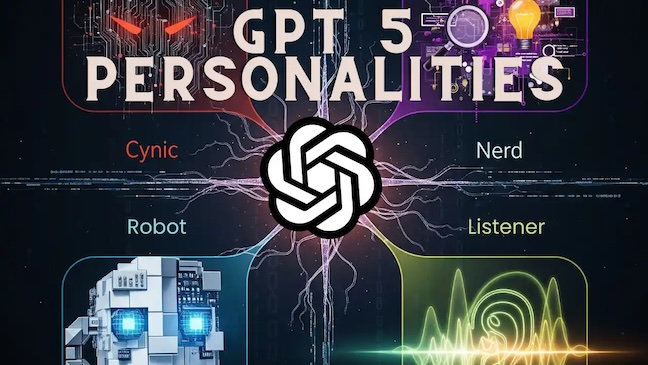
ChatGPT-5 Gives Your AI Personality
ChatGPT-5 introduces personality customization options, allowing users to select from “Cynic,” “Robot,” “Listener,” or “Nerd” alongside the default “Default” personality. These personalities adjust the tone and style of the chatbot’s responses. The customization is done through the “Personalization” settings within ChatGPT.
Changing the personality does not affect what ChatGPT can or cannot do, or the rules it follows for safety. It guides how ChatGPT communicates so you can choose a style that is most useful or enjoyable for you. Personality also does not affect certain types of content you ask it to produce. For example, if you request something like an email draft, code snippet, social media post, or résumé, ChatGPT will match the tone and style to your instructions and the context, not to the selected personality.
For example, if you have Listener selected and ask for Python code to calculate shipping costs, ChatGPT will provide the code in a clear, functional format based on your request — it will not add Listener’s usual reflective or conversational style.Your selected personality works alongside any saved memories or custom instructions you’ve set, which allows you to add nuance to any personality you choose. If your memory contains guidance that conflicts with a personality’s style (for example, a saved preference for serious and professional responses), it may override or reduce the visible traits of that personality. Similarly, instructions you give in a conversation can adjust or obscure a personality’s behavior.
Choosing your ChatGPT Personality
To choose a ChatGPT personality:
- Select your profile icon in the bottom-right corner.
- Choose Customize ChatGPT to access your “Customize ChatGPT settings”.
- Use the drop-down next to What personality should ChatGPT have? to select a personality.
You can also access these settings by going to your Settings, selecting Personalization, and accessing your Custom instructions.When you change your personality, the update takes effect only in new conversations. Any ongoing conversations will continue with the original personality.
iOS & Android
To choose a ChatGPT personality:
- Access your Settings by selecting your profile icon.
- Go to Personalization and select Custom Instructions.
- Choose your desired personality in “What personality should ChatGPT have?”
You can choose from four distinct personalities or use the Default personality. Default is the standard ChatGPT style: clear, neutral, and adaptable. The other personalities each have their own style and tone, described below.
Cynic – Sarcastic and dry, delivers blunt help with wit. Often teases, but provides direct, practical answers when it matters.What to expect:
- Candid responses that may include a sarcastic observation.
- Not hostile, but irreverent. It signals patience limits clearly.
Best for:
- Users who want candid, entertaining replies that are still actionable.
- Concrete guidance alongside the snark.
- Creative brainstorming where an edged voice is fine.
Robot – Precise, efficient, and emotionless, delivering direct answers without extra words.What to expect:
- Immediate direct answer first, followed by concise reasoning or steps.
- Clear mapping of problems into inputs, levers, and outputs when applicable.
- Occasional citations or references for factual claims.
Best for:
- Users who want direct, fast, unambiguous instructions.
- Technical tasks, code walk throughs, checklists, and troubleshooting.
Listener – Warm and laid-back, reflecting your thoughts back with calm clarity and light wit.What to expect:
- Responses that surface trade offs and likely outcomes.
- The occasional clarifying question or two if it helps give better guidance.
- Guidance aimed at helping users make their own decision.
Best for:
- Users who want a conversational sounding board.
- Decision support, personal reflection, and planning.
Nerd – Playful and curious, explaining concepts clearly while celebrating knowledge and discovery.What to expect:
- Deep but accessible explanations, trade-offs, and suggested next steps.
- Encouragement to explore follow up paths or experiments.
Best for:
- Users who want context, mechanisms, and optional next steps.
- Learning a new topic, deep dives, creative problem solving, and thought experiments.
Example Responses by Personality
Conversational
How should I spend a rainy day indoors?
| Default | A rainy day indoors can be the perfect excuse to slow down and do things you might not normally make time for. Here are some ideas depending on your mood: |
| Cynic | The universe is basically handing you an excuse to avoid all those “I’ll do it when I have time” projects. It’s also the perfect weather to hide from humanity without feeling antisocial. |
| Robot | Read, cook, clean, repair, or work on indoor hobbies. Organize files, learn online, or exercise at home. |
| Listener | Depends what you want the day to feel like.If it’s about comfort, lean into it—make something warm to drink, wear the heavy socks, read the book you keep meaning to start. Background rain makes almost anything feel like a scene.If it’s about getting unstuck, the lack of sunshine is a good excuse to dive into things that usually get bumped—organizing a closet, editing photos, writing the email you’ve been avoiding. The weather’s already moody; you don’t have to be. |
| Nerd | A rainy day indoors can be treated like nature’s polite excuse to indulge in things you might normally put off. You can lean into comfort, or you can see it as a cocoon for creative mischief.If you want, I can suggest a few unusual rainy-day projects that feel like time travel experiments without leaving the house. |
Give me a quick piece of advice before I give a big presentation.
| Default | Right before you start, take one slow, deep breath — it helps calm nerves and centers your voice.Then, make eye contact with your audience, smile, and pause for a beat before speaking. That moment of stillness makes you look confident and gives you control of the room from the very first word. |
| Cynic | Before you walk in there, remember: nobody cares about your slides as much as you think they do. They care about how you make them feel. Slow your pace, breathe like you own the room, and ditch the urge to cram every thought into one sentence. If your hands are shaking, just gesture more—it’ll look intentional. And for the love of your dignity, check your zipper before you start. |
| Robot | Decide on one core message and repeat it in the opening, body, and closing. That makes it more likely your audience will remember it. |
| Listener | Right before you start, pause for two slow breaths and make eye contact with someone friendly in the room. It’ll steady you and make the whole thing feel more like a conversation than a performance. |
| Nerd | Before you start, take one slow, deep breath and feel your feet firmly on the ground — it’s a tiny reset button for your nervous system. Then, remember this: the audience isn’t rooting for you to fail; they’re silently hoping you’ll succeed so they can relax and enjoy the ride. Speak a little slower than you think you should, make purposeful pauses, and lock eyes with different parts of the room like you’re having a series of small, friendly conversations.If you want a mental trick, imagine you’re explaining something fascinating to an old friend who’s genuinely curious — it shifts your tone from “presenter” to “trusted guide,” which is far more engaging. |
They read my message an hour ago. Am I overthinking this?
| Default | It’s totally normal to start spiraling a bit when someone sees your message but doesn’t reply right away — our brains love to fill in the silence with theories, usually unhelpful ones. |
| Cynic | Your brain is doing that thing where it tries to fill the silence with a whole season’s worth of plot twists. They might be busy, distracted, or just not in the mood to type—none of which is a secret referendum on your worth as a human. An hour in text-land is like a second in face-to-face time; people ghost their own laundry longer than that. |
| Robot | You are assuming intent from silence. One hour without a reply is not unusual. Without more data you cannot conclude anything. |
| Listener | Probably. But that’s not a moral failing, it’s just how the brain fills in blanks when it’s waiting. One hour is still in “life might’ve gotten busy” territory, not “they’re ignoring you” territory.If you can, park it somewhere—your mind will keep poking the thought like a loose tooth otherwise. |
| Nerd | Your brain is doing that classic human thing where it mistakes “no immediate reply” for “the end of the world.” In reality, there are a hundred mundane reasons they haven’t responded yet—busy, distracted, on a call, deep in another task, composing a thoughtful reply, or just… forgot for the moment.If this were a chemistry experiment, “They read my message” is just the introduction of a reagent; you haven’t given the reaction enough time to complete. Waiting a bit before drawing conclusions is like letting the solution settle—less foam, more clarity. |
Transforming SEO: From Finding Links to Answering Questions
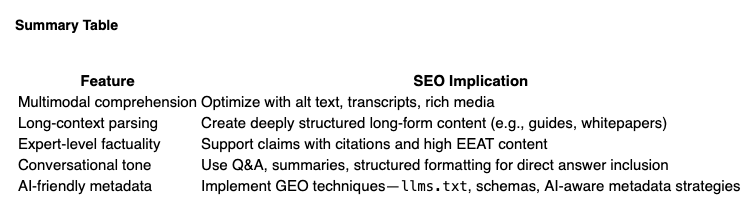
With GPT‑5’s arrival, traditional SEO is being redefined by the evolving landscape of Answer Engine Optimization (AEO) and Generative Engine Optimization (GEO).
- AEO (Answer Engine Optimization) aims for content that AI can directly quote—clear, conversational Q&A, structured headings, schema markup, and EEAT signals are vital.Wikipedia
- GEO (Generative Engine Optimization) focuses on making your content discoverable within AI-generated responses. Tactics include AI-specific metadata,
llms.txt, and structured cues to increase the chance of being cited.Wikipediain other words, GPT‑5 is a transformative AI horizon—shifting content discovery from traditional search to direct, context-aware generative interaction. For SEO, the focus must pivot to being the source of AI citations rather than just ranking.Serious SEO Impacts of ChatGPT-5
- Zero‑click Dominance: As GPT‑5 delivers precise, human‑like answers directly, fewer users may click through to traditional sites—so being featured in AI answers becomes crucialZero‑click Dominance: As GPT‑5 delivers precise, human‑like answers directly, fewer users may click through to traditional sites—so being featured in AI answers becomes crucial
Long‑form & structured content: GPT‑5’s ability to parse long documents and context means in‑depth, well-organized content is more likely to be used directly in answers.
Multimodal optimization: As GPT‑5 processes video, audio, and images, content creators may need to optimize across formats—not just text.
Larry Sivitz is the publisher of Seattle24x7 and the founder of SearchWrite. Contact him for AI-integrated workflow and online marketing solutions. [24×7]